Improving images added to Cartopy figures
metadata
- keywords:
- published:
- updated:
- Atom Feed
Today, I just had a Pull Request approved in Cartopy. This PR added **kwargs to the .background_img() method to be passed down the call stack to Cartopy’s .imshow() method. Why is this important? When drawing images in a figure, Cartopy:
- merges all tiles together (if applicable);
- warps the image to the figure’s projection;
- scales the image (to 750 px × 750 px by default); and
- passes the (merged and) warped and scaled image to MatPlotLib’s
.imshow()method.
The penultimate step of scaling the image to 750 px × 750 px is able to be overridden when using the .add_image() method, the .stock_img() method and Cartopy’s .imshow() method directly - but it was not available when using the .background_img() method. It should also be noted that Cartopy’s .imshow() method itself uses **kwargs and it passes them to MatPlotLib’s .imshow() method behind the scenes. This means that MatPlotLib keyword arguments, such as interpolation and resample, can also be passed. In short, when calling any of:
- Cartopy’s
.add_image()method; - Cartopy’s
.background_img()method; - Cartopy’s
.imshow()method; or - Cartopy’s
.stock_img()method
… you can pass:
interpolationand it will be passed down the call stack to MatPlotLib’s.imshow()method;regrid_shapeto set the shape of the intermediate temporary image which is drawn; andresampleand it will be passed down the call stack to MatPlotLib’s.imshow()method.
Why is this important? Plotting images is surprisingly complicated - there are a lot of nuances. I recommend that you read the MatPlotLib articles on image interpolation methods and image anti-aliasing and resampling.
PyGuymer3’s .geo.add_Cartopy_tiles() function accepts a res argument, which is the resolution of the figure in units of “metres per pixel”, and it uses this to calculate the tile zoom level from the tile provider. In this discussion, it is important to be clear when talking about “resolution”: there is the resolution in terms of “what is the scale of the map” and there is the resolution in terms of “what is the size of the image”. A user may want to set both of these parameters independently.
Earlier this year, I visited Italy and I did two hikes in the hills of Tuscany. Here is a map of the GPS tracks from those two hikes (both starting from the same parking space at the north end of the lake in the centre of the map):


The figure has a (radial) field-of-view of 3.067481… kilometres and a size of 7.2 inches × 7.2 inches with a resolution of 300 DPI (resulting in a size of 2,160 pixels × 2,160 pixels). The string “regrid_shape *= 2.0” in the title refers to regrid_shape being set to twice the pixel size of the figure, i.e., (4320, 4320) so as to ensure that the intermediate temporary image is downsampled for the final rendering (c.f. the default of (750, 750) which would result in upsampling by an approximate factor of 3). The string “res *= 2.0” in the title refers to res being set to twice the resolution of the figure, i.e., 5.680519… metres per pixel (resulting in a tile zoom level of 14 from the tile provider when using the “retina” tile size). The string “interpolation = gaussian” in the title is self-explanatory.
Using the Thunderforest “landscape” map style (at “retina” tile size), with interpolation = gaussian and resample = False, here is how the centre of the above figure looks for a variety of scale factors on regrid_shape and res:


The Cartopy default of regrid_shape = (750, 750) is between the top two rows of the above matrix - which is clearly terrible no matter which tile zoom level one chooses. Hopefully the above matrix will be useful to you when generating your own figures - you have to balance the detail of the thing that you are trying to show with the speed and memory usage of having large intermediate temporary images (whilst never forgetting the Nyquist frequency). Using tiles of too high a resolution will result in poor anti-aliasing (look at the thin contour lines in some of the above examples). Currently, not many tile providers provide tiles at “retina” tile sizes - those that do only provide them at twice the normal resolution. I think that the warping used when applying a cartographic transform within Cartopy and the interpolation used when rendering a figure within MatPlotLib justify the industry considering some sort of “super retina” tile size in future.
What does this all mean for single image backgrounds rather than merged tile backgrounds? Using a DPI of 300, no interpolation, no resampling and the Cartopy default of regrid_shape = (750, 750) then a map of the world using the usual Natural Earth background at different sizes looks like this animation (with gridlines and some great circles drawn to compare to the resolution of the background image):


Remaking the same animation but with Gaussian interpolation and regrid_shape being set to twice the pixel size of the figure (which is different to the pixel size of the axis within the figure) then the same animation looks like:


The below image compares the central region from each frame of the two animations.


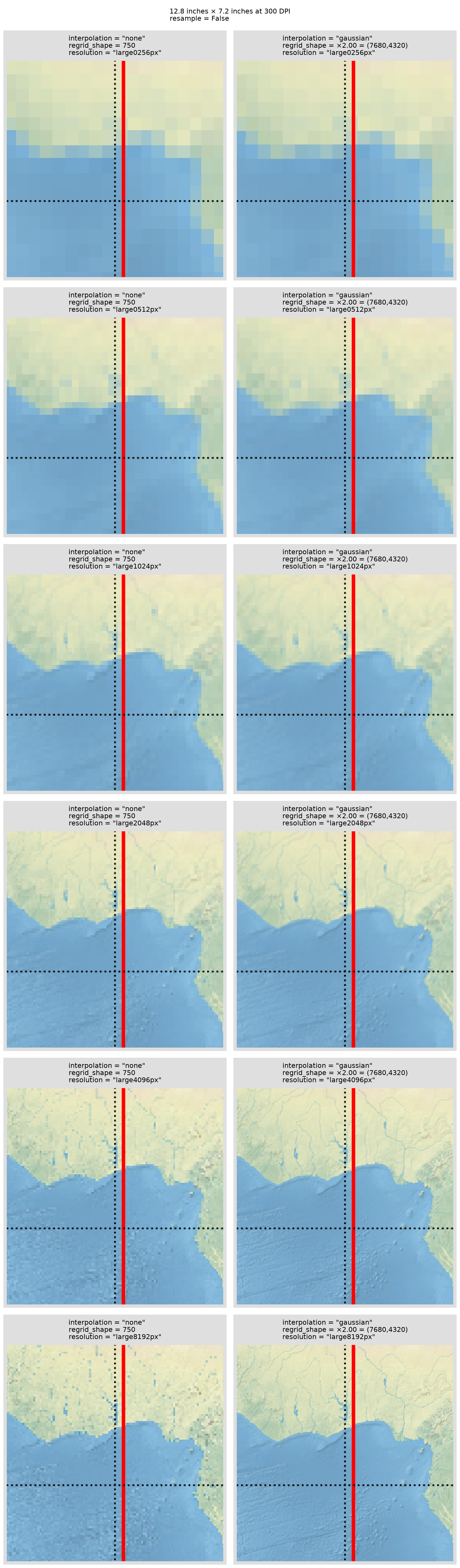
You can see that, using the Cartopy default of regrid_shape = (750, 750), there is little point in using a higher resolution background image than “large1024px” as the extra detail is just lost in the [down]scaling. Similarly, with regrid_shape being set to twice the pixel size of the figure, then “large4096px” is really the highest resolution background image that you should use if the figure is 12.8 inches × 7.2 inches with a resolution of 300 DPI.
The scripts to make some of the figures used in this post are available in studyImagesInCartopy.